 Ayingotts's notes
从分析一段 TS 代码开始
import { app } from "framework"

const dataLen = 3
const name = "iceman"

if (app) {
  console.log(name)
}

function getInfos(info: string) {
  const result = app.get(info)
  return result
}
import { app } from "framework"
const dataLen = 3
const name = "iceman"
if (app) {
console.log(name)
}
function getInfos(info: string) {
const result = app.get(info)
return result
}以上是一段 TS 代码片段,它的 API 调用信息是从依赖 framework 中引入了名为 app 的 API,并在第 6 行和第 11 行进行了调用。
需要通过程序的方式从代码片段中找出 app 这个 API 被导入后是否有调用,以及调用的次数,代码行分布等信息。
将待分析的代码解析为 AST
第一步,将需要分析的代码解析为 AST。
const tsCompiler = require("typescript") // TS编译器

// 待分析代码片段字符串
const tsCode = `import { app } from 'framework';

const dataLen = 3;
let name = 'iceman';

if(app){
    console.log(name);
}

function getInfos (info: string) {
    const result = app.get(info);
    return result;
}`

// 获取AST
const ast = tsCompiler.createSourceFile(
  "xxx",
  tsCode,
  tsCompiler.ScriptTarget.Latest,
  true,
)
console.log(ast)
const tsCompiler = require("typescript") // TS编译器
// 待分析代码片段字符串
const tsCode = `import { app } from 'framework';
const dataLen = 3;
let name = 'iceman';
if(app){
console.log(name);
}
function getInfos (info: string) {
const result = app.get(info);
return result;
}`
// 获取AST
const ast = tsCompiler.createSourceFile(
"xxx",
tsCode,
tsCompiler.ScriptTarget.Latest,
true,
)
console.log(ast)观察代码的 AST 解构及特征
结合可视化工具观察 AST 的结构及其特征。
要分析的代码片段总共包含 5 条语句,分别是:ImportDeclaration、VariableStatement、VariableStatement、IfStatement、FunctionDeclaration,然后这 5 个 AST 节点再继续派生出更详细的子节点,共同组成了映射这段 TS 代码的 AST 语法书结构,如图:
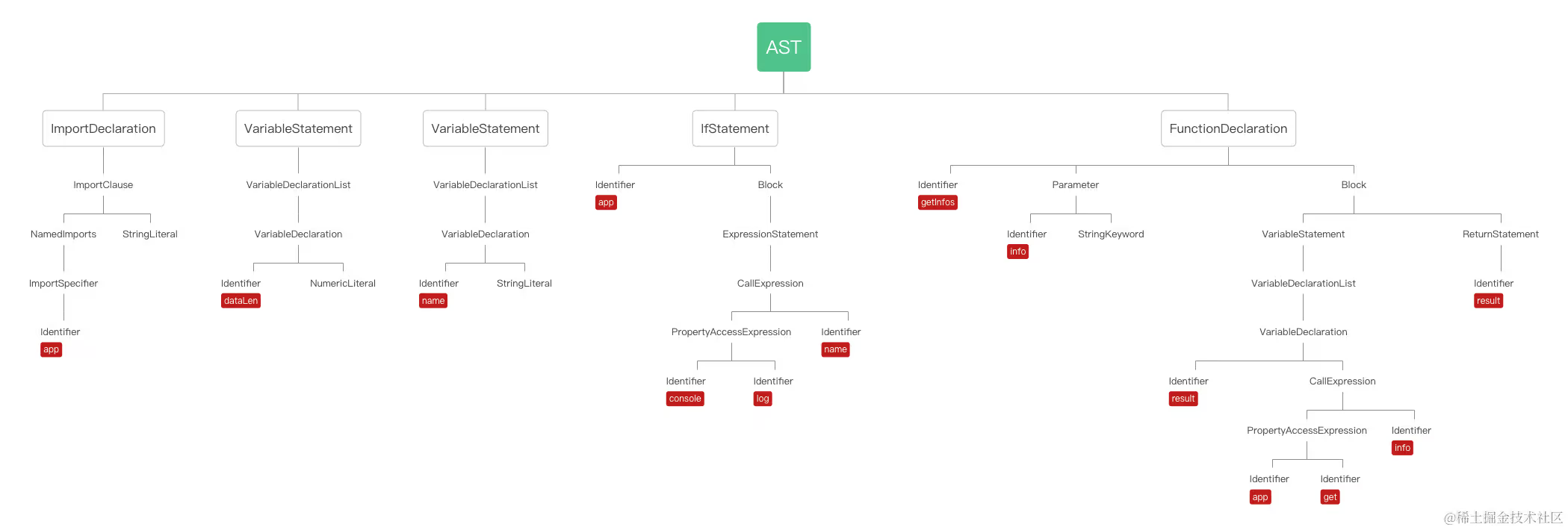
Identifier 节点通常为变量名、属性名、参数名等一系列声明和引用的名字,可以尝试通过遍历所有 Identifier 类型节点并判断它的名字是否为 app,来判断 app 这个 API 是否被调用。
遍历分析 AST 各级节点
TypeScript 的 forEachChild API 可以帮助实现对 AST 各层级节点的深度遍历,该方法第一个参数是指 AST 根节点或正在被遍历的子节点,第二个参数是一个回调函数,可以把对当前节点的判定逻辑写在这个回调函数里。
在 forEachChild 中打印每个节点:
const tsCompiler = require("typescript") // TS编译器
// 待分析代码片段字符串
const tsCode = `import { app } from 'framework';
const dataLen = 3;
let name = 'iceman';
if(app){
console.log(name);
}
function getInfos (info: string) {
const result = app.get(info);
return result;
}`
// 获取AST
const ast = tsCompiler.createSourceFile(
"xxx",
tsCode,
tsCompiler.ScriptTarget.Latest,
true,
)
// console.log(ast)
function walk(node) {
// AST遍历函数
tsCompiler.forEachChild(node, walk) // 遍历AST节点
console.log(node) // 输出节点信息
}
walk(ast) // 执行遍历const tsCompiler = require("typescript") // TS编译器
// 待分析代码片段字符串
const tsCode = `import { app } from 'framework';
const dataLen = 3;
let name = 'iceman';
if(app){
console.log(name);
}
function getInfos (info: string) {
const result = app.get(info);
return result;
}`
// 获取AST
const ast = tsCompiler.createSourceFile(
"xxx",
tsCode,
tsCompiler.ScriptTarget.Latest,
true,
)
// console.log(ast)
function walk(node) {
// AST遍历函数
tsCompiler.forEachChild(node, walk) // 遍历AST节点
console.log(node) // 输出节点信息
}
walk(ast) // 执行遍历TypeScript 提供了一系列判断节点类型的 Compiler API:
const tsCompiler = require("typescript")
// 判断节点类型的函数,返回值类型为 boolean
tsCompiler.isFunctionDeclaration(node) // 判定是否为函数声明节点
tsCompiler.isArrowFunction(node) // 判定是否为箭头函数
tsCompiler.isTypeReferenceNode(node) // 判定是否为Type类型节点
tsCompiler.isVariableDeclaration(node) // 判定是否为变量声明节点
tsCompiler.isIdentifier(node) // 判定是否为Identifier节点const tsCompiler = require("typescript")
// 判断节点类型的函数,返回值类型为 boolean
tsCompiler.isFunctionDeclaration(node) // 判定是否为函数声明节点
tsCompiler.isArrowFunction(node) // 判定是否为箭头函数
tsCompiler.isTypeReferenceNode(node) // 判定是否为Type类型节点
tsCompiler.isVariableDeclaration(node) // 判定是否为变量声明节点
tsCompiler.isIdentifier(node) // 判定是否为Identifier节点可以通过在 walk 函数中使用 tsCompiler.isIdentifier(node) 判断当前节点是否为 Identifier 类型节点,进而判断它的名字是否为 app。如果两个条件都满足的话,可以把这个节点的信息记录到一个 Map 解构中,Map 解构非常适合需要统计信息的分析场景。所以可以以 API 名称作为 key,将 API 调用的相关信息以对象的形式写入 value,等遍历完 AST 的全部节点后,就可以得到 app 这个 API 在代码中真实的调用情况了。
TIP
可以通过 AST 对象上的 getLineAndCharacterOfPosition 方法获取当前遍历节点的代码行信息:
// 获取当前node节点所在代码行
ast.getLineAndCharacterOfPosition(node.getStart()).line + 1// 获取当前node节点所在代码行
ast.getLineAndCharacterOfPosition(node.getStart()).line + 1基于以上内容,完善一下分析脚本:
const tsCompiler = require("typescript") // TS编译器
// 待分析代码片段字符串
const tsCode = `import { app } from 'framework';
const dataLen = 3;
let name = 'iceman';
if(app){
console.log(name);
}
function getInfos (info: string) {
const result = app.get(info);
return result;
}`
// 获取AST
const ast = tsCompiler.createSourceFile(
"xxx",
tsCode,
tsCompiler.ScriptTarget.Latest,
true,
)
// console.log(ast)
const apiMap = {} // 记录API分析结果
function walk(node) {
// AST遍历函数
tsCompiler.forEachChild(node, walk) // 遍历AST节点
const line = ast.getLineAndCharacterOfPosition(node.getStart()).line + 1 // 获取节点所在行
if (tsCompiler.isIdentifier(node) && node.escapedText === "app") {
// 判断isIdentifier节点名称是否为app
if (Object.keys(apiMap).includes(node.escapedText)) {
apiMap[node.escapedText].callNum++
apiMap[node.escapedText].callLines.push(line)
} else {
apiMap[node.escapedText] = {}
apiMap[node.escapedText].callNum = 1
apiMap[node.escapedText].callLines = []
apiMap[node.escapedText].callLines.push(line)
}
}
}
walk(ast)
console.log(apiMap) // 输出分析结果
// {
// app: {
// callNum: 3,
// callLines: [1,6,11]
// }
// }const tsCompiler = require("typescript") // TS编译器
// 待分析代码片段字符串
const tsCode = `import { app } from 'framework';
const dataLen = 3;
let name = 'iceman';
if(app){
console.log(name);
}
function getInfos (info: string) {
const result = app.get(info);
return result;
}`
// 获取AST
const ast = tsCompiler.createSourceFile(
"xxx",
tsCode,
tsCompiler.ScriptTarget.Latest,
true,
)
// console.log(ast)
const apiMap = {} // 记录API分析结果
function walk(node) {
// AST遍历函数
tsCompiler.forEachChild(node, walk) // 遍历AST节点
const line = ast.getLineAndCharacterOfPosition(node.getStart()).line + 1 // 获取节点所在行
if (tsCompiler.isIdentifier(node) && node.escapedText === "app") {
// 判断isIdentifier节点名称是否为app
if (Object.keys(apiMap).includes(node.escapedText)) {
apiMap[node.escapedText].callNum++
apiMap[node.escapedText].callLines.push(line)
} else {
apiMap[node.escapedText] = {}
apiMap[node.escapedText].callNum = 1
apiMap[node.escapedText].callLines = []
apiMap[node.escapedText].callLines.push(line)
}
}
}
walk(ast)
console.log(apiMap) // 输出分析结果
// {
// app: {
// callNum: 3,
// callLines: [1,6,11]
// }
// }分析脚本执行结果,并不符合预期,其中包含了 import 节点中的 app,需要排除这个干扰,修改后如下:
const tsCompiler = require("typescript") // TS编译器

// 待分析代码片段字符串
const tsCode = `import { app } from 'framework';

const dataLen = 3;
let name = 'iceman';

if(app){
    console.log(name);
}

function getInfos (info: string) {
    const result = app.get(info);
    return result;
}`

// 获取AST
const ast = tsCompiler.createSourceFile(
  "xxx",
  tsCode,
  tsCompiler.ScriptTarget.Latest,
  true,
)
console.log(ast)
const apiMap = {} // 记录API分析结果
function walk(node) {
// AST遍历函数
tsCompiler.forEachChild(node, walk) // 遍历AST节点
const line = ast.getLineAndCharacterOfPosition(node.getStart()).line + 1 // 获取节点所在行
if (tsCompiler.isIdentifier(node) && node.escapedText === "app") {
// 判断isIdentifier节点名称是否为app
if (line !== 1) {
// 排除import导入自身
if (Object.keys(apiMap).includes(node.escapedText)) {
apiMap[node.escapedText].callNum++
apiMap[node.escapedText].callLines.push(line)
} else {
apiMap[node.escapedText] = {}
apiMap[node.escapedText].callNum = 1
apiMap[node.escapedText].callLines = []
apiMap[node.escapedText].callLines.push(line)
}
}
}
}
walk(ast) // 遍历AST
console.log(apiMap) // 输出分析结果
// {
// app: {
// callNum: 2,
// callLines: [6, 11]
// }
// }const tsCompiler = require("typescript") // TS编译器
// 待分析代码片段字符串
const tsCode = `import { app } from 'framework';
const dataLen = 3;
let name = 'iceman';
if(app){
console.log(name);
}
function getInfos (info: string) {
const result = app.get(info);
return result;
}`
// 获取AST
const ast = tsCompiler.createSourceFile(
"xxx",
tsCode,
tsCompiler.ScriptTarget.Latest,
true,
)
console.log(ast)
const apiMap = {} // 记录API分析结果
function walk(node) {
// AST遍历函数
tsCompiler.forEachChild(node, walk) // 遍历AST节点
const line = ast.getLineAndCharacterOfPosition(node.getStart()).line + 1 // 获取节点所在行
if (tsCompiler.isIdentifier(node) && node.escapedText === "app") {
// 判断isIdentifier节点名称是否为app
if (line !== 1) {
// 排除import导入自身
if (Object.keys(apiMap).includes(node.escapedText)) {
apiMap[node.escapedText].callNum++
apiMap[node.escapedText].callLines.push(line)
} else {
apiMap[node.escapedText] = {}
apiMap[node.escapedText].callNum = 1
apiMap[node.escapedText].callLines = []
apiMap[node.escapedText].callLines.push(line)
}
}
}
}
walk(ast) // 遍历AST
console.log(apiMap) // 输出分析结果
// {
// app: {
// callNum: 2,
// callLines: [6, 11]
// }
// }分析脚本存在的问题
首先,脚本没有先对 import 节点进行分析,如果代码中都不存在 import 导入语句,那么通过遍历所有 Identifier 类型节点名称是否为 app 的思路,只能找到同名 AST 节点而已,并不能代表这些 app 都是从 framework 中导入的。如:
import { app } from "framework" // import app 定义

const dataLen = 3
const name = "iceman"

function doWell() {
  const app = 4 // 局部常量 app 定义
  return app // 局部常量 app 调用
}

function getInfos(info: string) {
  const result = app.get(info) // import app 调用
  return result
}
import { app } from "framework" // import app 定义
const dataLen = 3
const name = "iceman"
function doWell() {
const app = 4 // 局部常量 app 定义
return app // 局部常量 app 调用
}
function getInfos(info: string) {
const result = app.get(info) // import app 调用
return result
}在上述要分析的代码片段中增加一个新的函数 doWell,并在它内部定义一个局部变量 app,这时候之前的脚本无法区分 doWell 函数中的 app 与 getInfos 函数中的 app,即无法判定同名 Identifier 节点是否属于同一语义上下文。
其它问题:
- 无法判断
appAPI 的具体用途 ( 类型、属性、方法、类 ... ) - 无法区分
app.get链式调用与app直接调用这两种场景 - 排除
import节点的判断方式不准确
为了解决上述问题,需要明确,依赖调用分析到底需要做什么?
依赖调用分析到底要做什么?
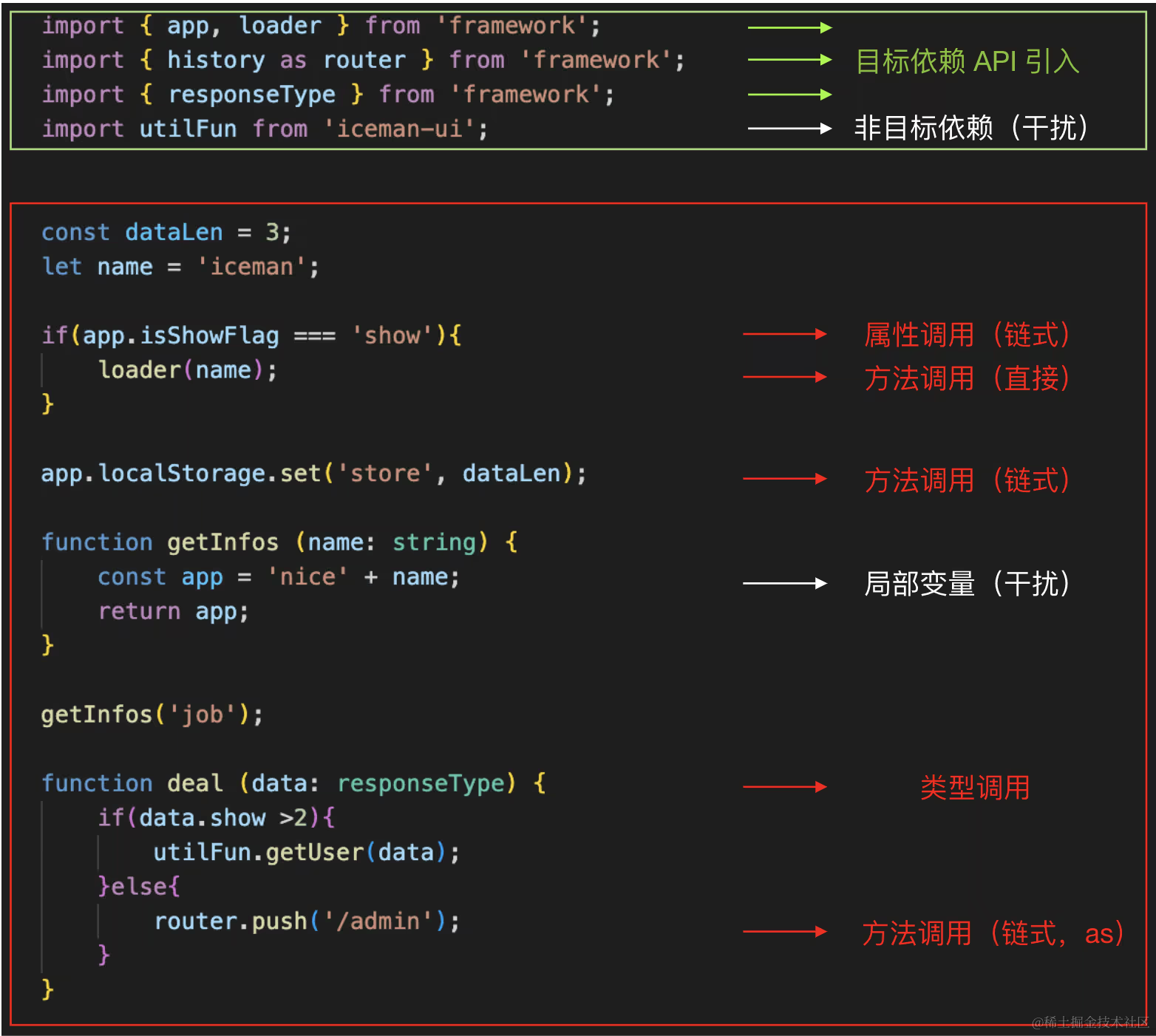
对于每一个需要分析的 TS ( JS ) 文件:
- 遍历其所有
import节点 ( 上图绿框区域 ),分析并记录从目标依赖引入的 API 信息,并排除非目标依赖项的干扰 - 判定引入的 API 在具体代码中 ( 上图红框区域 ) 是否有调用,过程中还需要排除局部同名变量等一系列干扰
- 根据分析指标,如用途识别 ( 类型、属性、方法 ) 等对该 API 调用进行指标判定分析,命中则记录到指定 Map 中
按照上面的步骤依次遍历所有项目中指定的 TS ( JS ) 文件,就可以得到全部应用于特定依赖的 API 调用分析数据。最后根据使用场景 ( 告警、评分、代码报告、代码建议等 ) 对分析数据进行标记,二次整理,即可输出最终的分析结果。