 Ayingotts's notes
curl
curl,用于发送请求的命令行工具,一个 HTTP 请求客户端 ( 实际上它也可以做 FTP/SCP/TELNET 协议的事情 )。可类比于浏览器中的 fetch 。
curl 是最为流行的 HTTP 请求命令行工具,在谷歌浏览器控制台的网络面板中,可将挡墙请求转化为 curl 。
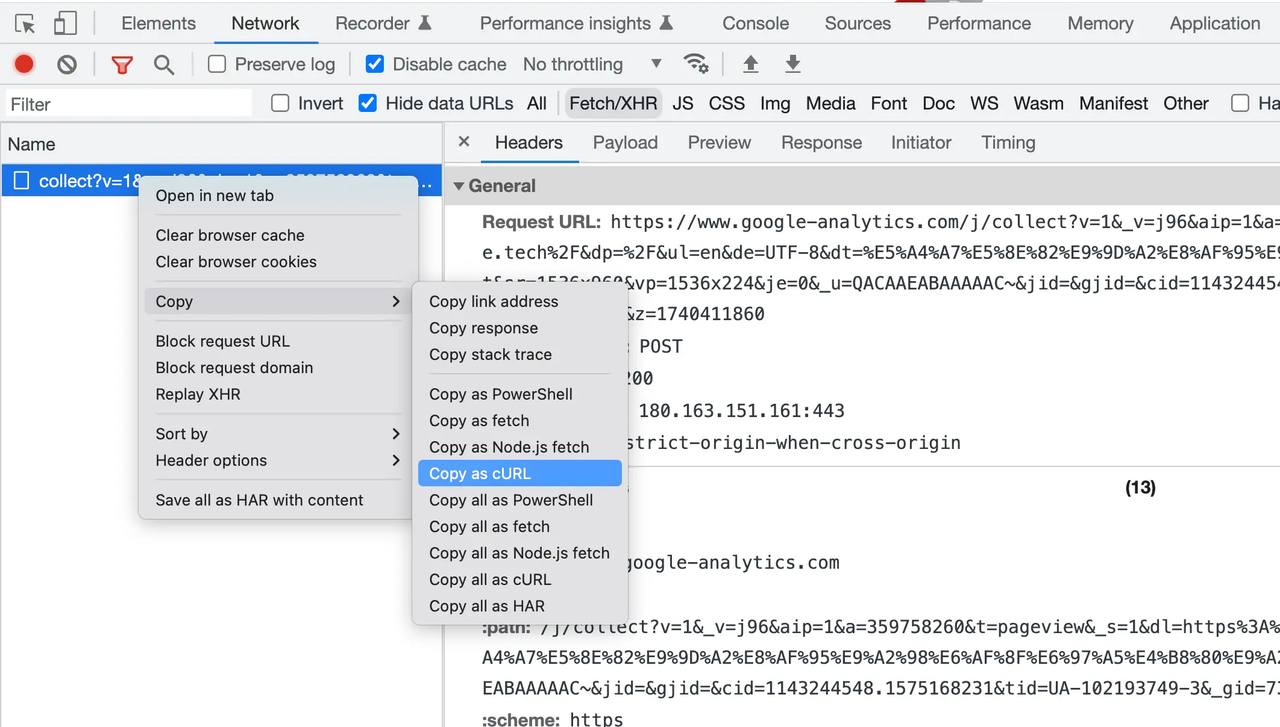
在学习与调试 HTTP 的过程中,可结合 curl 与 httpbin 一同使用。httpbin 可以测试 HTTP 各种方法、状态码、头部、基本认证及摘要认证等。
curl 与常见选项
如果紧跟 URL,则直接发送 GET 请求。
一个获取客户端公网 IP 的服务 :
bash
$ curl ifconfig.me
121.238.99.108
$ curl ifconfig.me
121.238.99.108一些常见选项 :
-X/--request: 指定请求方法-I/--head: 发送 HEAD 请求-H/--header: 指定请求头-d/--data: 指定请求体
curl --request
--request/-X,指定请求方法,如 POST、GET 等方法,默认为 GET 请求。
bash
$ curl https://httpbin.org/post -X POST -H "a: 3" -H "b: 4"
{
  "args": {},
  "data": "",
  "files": {},
  "form": {},
  "headers": {
    "A": "3",
    "Accept": "*/*",
    "B": "4",
    "Connection": "close",
    "Host": "httpbin.org",
    "User-Agent": "curl/7.79.1"
  },
  "json": null,
  "origin": "118.113.0.137",
  "url": "https://httpbin.org/post"
}
$ curl https://httpbin.org/post -X POST -H "a: 3" -H "b: 4"
{
"args": {},
"data": "",
"files": {},
"form": {},
"headers": {
"A": "3",
"Accept": "*/*",
"B": "4",
"Connection": "close",
"Host": "httpbin.org",
"User-Agent": "curl/7.79.1"
},
"json": null,
"origin": "118.113.0.137",
"url": "https://httpbin.org/post"
}curl --head
--head/-I 发送 HEAD 请求,只会返回 Response Header。
bash
$ curl --head https://shanyue.tech
HTTP/2 200
server: Tengine
content-type: text/html; charset=utf-8
content-length: 33229
vary: Accept-Encoding
date: Tue, 21 Jun 2022 05:54:24 GMT
vary: Accept-Encoding
x-oss-request-id: 62B15D1050ED1C32320FE906
x-oss-cdn-auth: success
accept-ranges: bytes
etag: "F540C0D57CDB57215AF11970EF4AAEF6"
last-modified: Wed, 23 Mar 2022 14:57:44 GMT
x-oss-object-type: Normal
x-oss-hash-crc64ecma: 8545542358272103335
x-oss-storage-class: Standard
x-oss-meta-mtime: 1648047444.796073379
cache-control: no-cache
content-md5: 9UDA1XzbVyFa8Rlw70qu9g==
x-oss-server-time: 27
ali-swift-global-savetime: 1655790864
via: cache12.l2cn3051[290,290,200-0,M], cache4.l2cn3051[291,0], kunlun6.cn3145[383,382,200-0,M], kunlun3.cn3145[386,0]
x-cache: MISS TCP_MISS dirn:-2:-2
x-swift-savetime: Tue, 21 Jun 2022 05:54:24 GMT
x-swift-cachetime: 0
timing-allow-origin: *
eagleid: 791d26a916557908641262834e
$ curl --head https://shanyue.tech
HTTP/2 200
server: Tengine
content-type: text/html; charset=utf-8
content-length: 33229
vary: Accept-Encoding
date: Tue, 21 Jun 2022 05:54:24 GMT
vary: Accept-Encoding
x-oss-request-id: 62B15D1050ED1C32320FE906
x-oss-cdn-auth: success
accept-ranges: bytes
etag: "F540C0D57CDB57215AF11970EF4AAEF6"
last-modified: Wed, 23 Mar 2022 14:57:44 GMT
x-oss-object-type: Normal
x-oss-hash-crc64ecma: 8545542358272103335
x-oss-storage-class: Standard
x-oss-meta-mtime: 1648047444.796073379
cache-control: no-cache
content-md5: 9UDA1XzbVyFa8Rlw70qu9g==
x-oss-server-time: 27
ali-swift-global-savetime: 1655790864
via: cache12.l2cn3051[290,290,200-0,M], cache4.l2cn3051[291,0], kunlun6.cn3145[383,382,200-0,M], kunlun3.cn3145[386,0]
x-cache: MISS TCP_MISS dirn:-2:-2
x-swift-savetime: Tue, 21 Jun 2022 05:54:24 GMT
x-swift-cachetime: 0
timing-allow-origin: *
eagleid: 791d26a916557908641262834ecurl --include
--include/-i,打印 Response Header 与 Response Body。
bash
HTTP/1.1 200 OK
access-control-allow-origin: *
content-type: text/plain; charset=utf-8
content-length: 15
date: Wed, 17 Aug 2022 01:56:20 GMT
x-envoy-upstream-service-time: 1
strict-transport-security: max-age=2592000; includeSubDomains
server: istio-envoy
Via: 1.1 google

222.222.222.113%
HTTP/1.1 200 OK
access-control-allow-origin: *
content-type: text/plain; charset=utf-8
content-length: 15
date: Wed, 17 Aug 2022 01:56:20 GMT
x-envoy-upstream-service-time: 1
strict-transport-security: max-age=2592000; includeSubDomains
server: istio-envoy
Via: 1.1 google
222.222.222.113%curl --verbose
--verbose/-v,查看发送报文及 TLS handshake 的详细。
bash
# 有的命令 -v 是一级详细日志,-vv 是更详细,-vvv 是更更详细
$ curl -vvv --head https://shanyue.tech
* Rebuilt URL to: https://shanyue.tech/
*   Trying 218.91.183.88...
* TCP_NODELAY set
* Connected to shanyue.tech (218.91.183.88) port 443 (#0)
* ALPN, offering h2
* ALPN, offering http/1.1
* successfully set certificate verify locations:
*   CAfile: /etc/pki/tls/certs/ca-bundle.crt
  CApath: none
* TLSv1.3 (OUT), TLS handshake, Client hello (1):
* TLSv1.3 (IN), TLS handshake, Server hello (2):
* TLSv1.3 (IN), TLS handshake, [no content] (0):
* TLSv1.3 (IN), TLS handshake, Encrypted Extensions (8):
* TLSv1.3 (IN), TLS handshake, [no content] (0):
* TLSv1.3 (IN), TLS handshake, Certificate (11):
* TLSv1.3 (IN), TLS handshake, [no content] (0):
* TLSv1.3 (IN), TLS handshake, CERT verify (15):
* TLSv1.3 (IN), TLS handshake, [no content] (0):
* TLSv1.3 (IN), TLS handshake, Finished (20):
* TLSv1.3 (OUT), TLS change cipher, Change cipher spec (1):
* TLSv1.3 (OUT), TLS handshake, [no content] (0):
* TLSv1.3 (OUT), TLS handshake, Finished (20):
* SSL connection using TLSv1.3 / TLS_AES_256_GCM_SHA384
* ALPN, server accepted to use h2
* Server certificate:
*  subject: CN=shanyue.tech
*  start date: Feb  5 00:00:00 2022 GMT
*  expire date: Feb  6 23:59:59 2023 GMT
*  subjectAltName: host "shanyue.tech" matched cert's "shanyue.tech"
*  issuer: C=US; O=DigiCert Inc; OU=www.digicert.com; CN=Encryption Everywhere DV TLS CA - G1
*  SSL certificate verify ok.
* Using HTTP2, server supports multi-use
* Connection state changed (HTTP/2 confirmed)
* Copying HTTP/2 data in stream buffer to connection buffer after upgrade: len=0
* TLSv1.3 (OUT), TLS app data, [no content] (0):
* TLSv1.3 (OUT), TLS app data, [no content] (0):
* TLSv1.3 (OUT), TLS app data, [no content] (0):
* Using Stream ID: 1 (easy handle 0x55c5a8e24690)
* TLSv1.3 (OUT), TLS app data, [no content] (0):
> HEAD / HTTP/2
> Host: shanyue.tech
> User-Agent: curl/7.61.1
> Accept: */*
>
* TLSv1.3 (IN), TLS handshake, [no content] (0):
* TLSv1.3 (IN), TLS handshake, Newsession Ticket (4):
* TLSv1.3 (IN), TLS handshake, [no content] (0):
* TLSv1.3 (IN), TLS handshake, Newsession Ticket (4):
* TLSv1.3 (IN), TLS app data, [no content] (0):
* Connection state changed (MAX_CONCURRENT_STREAMS == 128)!
* TLSv1.3 (OUT), TLS app data, [no content] (0):
* TLSv1.3 (IN), TLS app data, [no content] (0):
< HTTP/2 200
HTTP/2 200
< server: Tengine
server: Tengine
< content-type: text/html; charset=utf-8
content-type: text/html; charset=utf-8
< content-length: 33229
content-length: 33229
< vary: Accept-Encoding
vary: Accept-Encoding
< date: Tue, 21 Jun 2022 06:02:59 GMT
date: Tue, 21 Jun 2022 06:02:59 GMT
< vary: Accept-Encoding
vary: Accept-Encoding
< x-oss-request-id: 62B15F13F15BB231391FB3A8
x-oss-request-id: 62B15F13F15BB231391FB3A8
< x-oss-cdn-auth: success
x-oss-cdn-auth: success
< accept-ranges: bytes
accept-ranges: bytes
< etag: "F540C0D57CDB57215AF11970EF4AAEF6"
etag: "F540C0D57CDB57215AF11970EF4AAEF6"
< last-modified: Wed, 23 Mar 2022 14:57:44 GMT
last-modified: Wed, 23 Mar 2022 14:57:44 GMT
< x-oss-object-type: Normal
x-oss-object-type: Normal
< x-oss-hash-crc64ecma: 8545542358272103335
x-oss-hash-crc64ecma: 8545542358272103335
< x-oss-storage-class: Standard
x-oss-storage-class: Standard
< x-oss-meta-mtime: 1648047444.796073379
x-oss-meta-mtime: 1648047444.796073379
< cache-control: no-cache
cache-control: no-cache
< content-md5: 9UDA1XzbVyFa8Rlw70qu9g==
content-md5: 9UDA1XzbVyFa8Rlw70qu9g==
< x-oss-server-time: 3
x-oss-server-time: 3
< ali-swift-global-savetime: 1655791379
ali-swift-global-savetime: 1655791379
< via: cache24.l2et15-1[66,66,200-0,M], cache44.l2et15-1[67,0], cache27.cn4056[128,128,200-0,M], cache64.cn4056[130,0]
via: cache24.l2et15-1[66,66,200-0,M], cache44.l2et15-1[67,0], cache27.cn4056[128,128,200-0,M], cache64.cn4056[130,0]
< x-cache: MISS TCP_MISS dirn:-2:-2
x-cache: MISS TCP_MISS dirn:-2:-2
< x-swift-savetime: Tue, 21 Jun 2022 06:02:59 GMT
x-swift-savetime: Tue, 21 Jun 2022 06:02:59 GMT
< x-swift-cachetime: 0
x-swift-cachetime: 0
< timing-allow-origin: *
timing-allow-origin: *
< eagleid: 088432cc16557913793393217e
eagleid: 088432cc16557913793393217e

<
* Connection #0 to host shanyue.tech left intact
# 有的命令 -v 是一级详细日志,-vv 是更详细,-vvv 是更更详细
$ curl -vvv --head https://shanyue.tech
* Rebuilt URL to: https://shanyue.tech/
* Trying 218.91.183.88...
* TCP_NODELAY set
* Connected to shanyue.tech (218.91.183.88) port 443 (#0)
* ALPN, offering h2
* ALPN, offering http/1.1
* successfully set certificate verify locations:
* CAfile: /etc/pki/tls/certs/ca-bundle.crt
CApath: none
* TLSv1.3 (OUT), TLS handshake, Client hello (1):
* TLSv1.3 (IN), TLS handshake, Server hello (2):
* TLSv1.3 (IN), TLS handshake, [no content] (0):
* TLSv1.3 (IN), TLS handshake, Encrypted Extensions (8):
* TLSv1.3 (IN), TLS handshake, [no content] (0):
* TLSv1.3 (IN), TLS handshake, Certificate (11):
* TLSv1.3 (IN), TLS handshake, [no content] (0):
* TLSv1.3 (IN), TLS handshake, CERT verify (15):
* TLSv1.3 (IN), TLS handshake, [no content] (0):
* TLSv1.3 (IN), TLS handshake, Finished (20):
* TLSv1.3 (OUT), TLS change cipher, Change cipher spec (1):
* TLSv1.3 (OUT), TLS handshake, [no content] (0):
* TLSv1.3 (OUT), TLS handshake, Finished (20):
* SSL connection using TLSv1.3 / TLS_AES_256_GCM_SHA384
* ALPN, server accepted to use h2
* Server certificate:
* subject: CN=shanyue.tech
* start date: Feb 5 00:00:00 2022 GMT
* expire date: Feb 6 23:59:59 2023 GMT
* subjectAltName: host "shanyue.tech" matched cert's "shanyue.tech"
* issuer: C=US; O=DigiCert Inc; OU=www.digicert.com; CN=Encryption Everywhere DV TLS CA - G1
* SSL certificate verify ok.
* Using HTTP2, server supports multi-use
* Connection state changed (HTTP/2 confirmed)
* Copying HTTP/2 data in stream buffer to connection buffer after upgrade: len=0
* TLSv1.3 (OUT), TLS app data, [no content] (0):
* TLSv1.3 (OUT), TLS app data, [no content] (0):
* TLSv1.3 (OUT), TLS app data, [no content] (0):
* Using Stream ID: 1 (easy handle 0x55c5a8e24690)
* TLSv1.3 (OUT), TLS app data, [no content] (0):
> HEAD / HTTP/2
> Host: shanyue.tech
> User-Agent: curl/7.61.1
> Accept: */*
>
* TLSv1.3 (IN), TLS handshake, [no content] (0):
* TLSv1.3 (IN), TLS handshake, Newsession Ticket (4):
* TLSv1.3 (IN), TLS handshake, [no content] (0):
* TLSv1.3 (IN), TLS handshake, Newsession Ticket (4):
* TLSv1.3 (IN), TLS app data, [no content] (0):
* Connection state changed (MAX_CONCURRENT_STREAMS == 128)!
* TLSv1.3 (OUT), TLS app data, [no content] (0):
* TLSv1.3 (IN), TLS app data, [no content] (0):
< HTTP/2 200
HTTP/2 200
< server: Tengine
server: Tengine
< content-type: text/html; charset=utf-8
content-type: text/html; charset=utf-8
< content-length: 33229
content-length: 33229
< vary: Accept-Encoding
vary: Accept-Encoding
< date: Tue, 21 Jun 2022 06:02:59 GMT
date: Tue, 21 Jun 2022 06:02:59 GMT
< vary: Accept-Encoding
vary: Accept-Encoding
< x-oss-request-id: 62B15F13F15BB231391FB3A8
x-oss-request-id: 62B15F13F15BB231391FB3A8
< x-oss-cdn-auth: success
x-oss-cdn-auth: success
< accept-ranges: bytes
accept-ranges: bytes
< etag: "F540C0D57CDB57215AF11970EF4AAEF6"
etag: "F540C0D57CDB57215AF11970EF4AAEF6"
< last-modified: Wed, 23 Mar 2022 14:57:44 GMT
last-modified: Wed, 23 Mar 2022 14:57:44 GMT
< x-oss-object-type: Normal
x-oss-object-type: Normal
< x-oss-hash-crc64ecma: 8545542358272103335
x-oss-hash-crc64ecma: 8545542358272103335
< x-oss-storage-class: Standard
x-oss-storage-class: Standard
< x-oss-meta-mtime: 1648047444.796073379
x-oss-meta-mtime: 1648047444.796073379
< cache-control: no-cache
cache-control: no-cache
< content-md5: 9UDA1XzbVyFa8Rlw70qu9g==
content-md5: 9UDA1XzbVyFa8Rlw70qu9g==
< x-oss-server-time: 3
x-oss-server-time: 3
< ali-swift-global-savetime: 1655791379
ali-swift-global-savetime: 1655791379
< via: cache24.l2et15-1[66,66,200-0,M], cache44.l2et15-1[67,0], cache27.cn4056[128,128,200-0,M], cache64.cn4056[130,0]
via: cache24.l2et15-1[66,66,200-0,M], cache44.l2et15-1[67,0], cache27.cn4056[128,128,200-0,M], cache64.cn4056[130,0]
< x-cache: MISS TCP_MISS dirn:-2:-2
x-cache: MISS TCP_MISS dirn:-2:-2
< x-swift-savetime: Tue, 21 Jun 2022 06:02:59 GMT
x-swift-savetime: Tue, 21 Jun 2022 06:02:59 GMT
< x-swift-cachetime: 0
x-swift-cachetime: 0
< timing-allow-origin: *
timing-allow-origin: *
< eagleid: 088432cc16557913793393217e
eagleid: 088432cc16557913793393217e
<
* Connection #0 to host shanyue.tech left intactcurl --location
--location/-L,追踪重定向。
bash
# 重定向两次后请求到数据
$ curl --location http://zhihu.com

# 可使用 --head,查看到三次响应
$ curl --head --location http://zhihu.com
# 重定向两次后请求到数据
$ curl --location http://zhihu.com
# 可使用 --head,查看到三次响应
$ curl --head --location http://zhihu.comhttpie and examples
httpie 是更现代化更为流行的一个 HTTP 客户端,支持色彩、JSON 等。
bash
# 发送 JSON 数据给服务器端,httpie 比 curl 方便很多,不需要自己手写 header,curl 默认为 application/x-www-form-urlencoded
$ http POST httpbin.org/post "a: 3" name=shanyue
$ curl -X POST httpbin.org/post -H "a: 3" -H "content-type: application/json" -d '{"name": "shanyue"}'

# 发送 Form 数据给服务器端,curl/httpie 都比较方便
$ http -f POST httpbin.org/post "a: 3" name=shanyue
$ curl -X POST httpbin.org/post -H "a: 3" -d name=shanyue

# 上传文件
$ http POST httpbin.org/post < Readme.md
$ curl -X POST httpbin.org/post -H "content-type: application/json" -d @Readme.md

# multipart 上传文件
$ http --multipart httpbin.org/post a=3 b@'Readme.md'
# 发送 JSON 数据给服务器端,httpie 比 curl 方便很多,不需要自己手写 header,curl 默认为 application/x-www-form-urlencoded
$ http POST httpbin.org/post "a: 3" name=shanyue
$ curl -X POST httpbin.org/post -H "a: 3" -H "content-type: application/json" -d '{"name": "shanyue"}'
# 发送 Form 数据给服务器端,curl/httpie 都比较方便
$ http -f POST httpbin.org/post "a: 3" name=shanyue
$ curl -X POST httpbin.org/post -H "a: 3" -d name=shanyue
# 上传文件
$ http POST httpbin.org/post < Readme.md
$ curl -X POST httpbin.org/post -H "content-type: application/json" -d @Readme.md
# multipart 上传文件
$ http --multipart httpbin.org/post a=3 b@'Readme.md'